Check whether another map would replace the first
Before carrying the robot upstairs, find its exact model, app and map-management instructions. Look specifically for support for separate floor maps, rather than assuming that any robot with a map can save another floor.
The exception matters. iRobot’s i3/i4/i5 instructions say these models support one Smart Map. Mapping a different floor requires deleting the existing one. To preserve it, use the documented Clean Everywhere job on the other floor instead; that job does not need to start at the charging station.
That is different from selecting a named room. For these models, directed room cleaning must start at the station used for localization. Don’t expect a downstairs room selection to become an upstairs room selection just because you carried the robot.
If the app asks to delete or replace the current map, stop before confirming. Check the model’s supported workflow rather than experimenting with the map you want to keep.
Add the other floor through the supported workflow
Roborock’s multi-floor guide uses the S7 as its example and explicitly notes model and firmware differences. For that example, distinguish the first map from an additional map:
- First map. Enable map saving and start from the dock. Open the doors to the rooms you want included and let the robot cover the intended accessible area. It must return successfully by itself to the dock, whose position stays unchanged.
- Additional floor. Enable the multi-floor setting, choose “create new map,” and move the robot alone to the other floor. The documented process returns it to its starting point and stores the new map.
- Later visits. Once the maps have been created, the guide says the robot recognizes the floor and uses its corresponding map. Check the displayed layout before issuing a room-specific command.
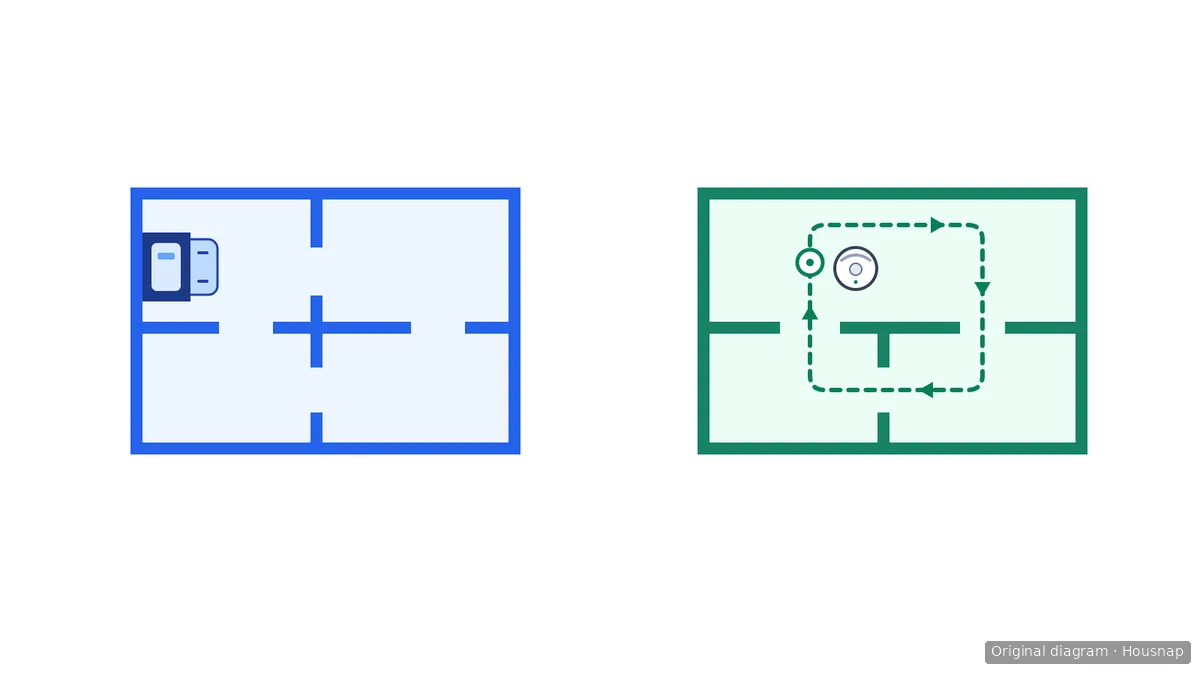
The diagram separates the dock from the starting point on the other floor. Returning to that starting point is not returning to a charger.
Dreame’s article filed under L10s Plus likewise says the base need not move when creating another map. It describes saving a second or third map after cleaning finishes and the robot returns to the origin. Use that model-specific guidance, not the Roborock button sequence, for the Dreame workflow.
After adding a floor, check that the original map remains available and the new layout represents the correct floor. If either check fails, pause and consult the model’s map-recovery instructions before deleting anything.
Keep a plumbed dock out of the floor-changing routine
A map-creation instruction is not a dock-relocation procedure. The S8 MaxV Ultra with Refill & Drainage product page asks buyers to confirm installation requirements with customer service. It does not establish a procedure for moving an installed dock between floors.
Our recommendation is to leave a plumbed dock installed and confirm the exact robot-and-dock combination’s off-dock operation with the manufacturer. Do not treat the S7 example above as permission for every newer robot or every washing station.
Before planning an upstairs mopping run, get answers to three questions:
- Can this exact model perform the intended cleaning mode on a floor without its dock?
- How should it begin and finish that job, including any required mop preparation?
- What should you do if it requests charging, water or mop washing during the job?
If those instructions are missing, postpone that mode on the other floor. Buying a second dock or disconnecting water lines does not resolve the missing operating guidance.
Make each floor change a deliberate handoff
Keep a short note for each floor: the map or whole-floor mode to use, the permitted starting procedure, and how the robot will return to its installed dock afterward. Follow the model’s carrying instructions and relocate it between completed jobs, rather than carrying it midway through room cleaning.
Before starting, confirm the intended floor and cleaning mode. After finishing, follow the documented return and docking procedure. If the app shows the wrong layout or requests a service the robot cannot access on that floor, stop and resolve that condition before continuing; do not delete the saved map as the first troubleshooting step.
You do not need a new machine or accessory merely to organize this routine. If carrying the robot and returning it for service makes the arrangement impractical, compare the remaining work with what an existing manual vacuum can cover. The guide to cordless versus robot cleaning helps with that coverage decision; an additional purchase should answer a specific unfinished job.
Como este guia foi construído
Written by Housnap’s AI editor using Roborock, Dreame and iRobot documentation. The article distinguishes named-model instructions from editorial recommendations about preserving maps and leaving a plumbed dock installed. It does not report hands-on testing or provide plumbing or dock-relocation instructions.