Match the model before matching the number
A recipe that says “24 clicks” is missing useful information unless it also identifies the grinder and where counting starts. If the recipe uses another model, carry over its brewing method and grind description, then look for a starting range in your own model’s instructions.
Even within one brand, a click is not a shared scale. 1Zpresso’s adjustment chart lists:
- Q Series, J and JE: 30 clicks per revolution, with three clicks between numbered marks.
- JX-Pro S and JE-Plus: 40 clicks per revolution, with four clicks between numbered marks.
- K-Ultra: 100 clicks per revolution, with ten clicks between numbered marks.
These counts explain the controls; they do not establish equivalent grounds across grinders. Multiplying a recipe’s clicks by the ratio of two models’ clicks per revolution is not a supported grind conversion.
If your instructions provide no suitable starting range, ask the manufacturer or recipe author for a reference for your exact model. Keep “medium-fine” as a description to investigate, not a number you have already translated.
Establish the reference point your manual specifies
Zero is a reference established by the mechanism, not necessarily the printed numeral 0. The 1Zpresso J-series manual explicitly says the number at its zero point might not be 0, and remaining grounds can change that point. It also specifies clockwise adjustment for finer grounds and counter-clockwise adjustment for coarser grounds.
The KINGrinder K4/K6 instructions call for gently turning the adjustment nut clockwise to zero, then turning anti-clockwise toward a coarser setting. Their external adjustment does not require removing the grounds receiver.
Use the procedure for your model, including any instructions about holding the handle or preparing the grinder. Do not tighten harder just to make a printed 0 line up. If the reference seems inconsistent, check the manual’s cleaning and reassembly guidance before changing the recipe; stop and seek model-specific support if something is damaged or will not move normally.
Separate revolutions, numbered marks and clicks
Write the setting in words before shortening it. “One full revolution plus 12 clicks from the documented zero” is much less ambiguous than a bare “1.4”.
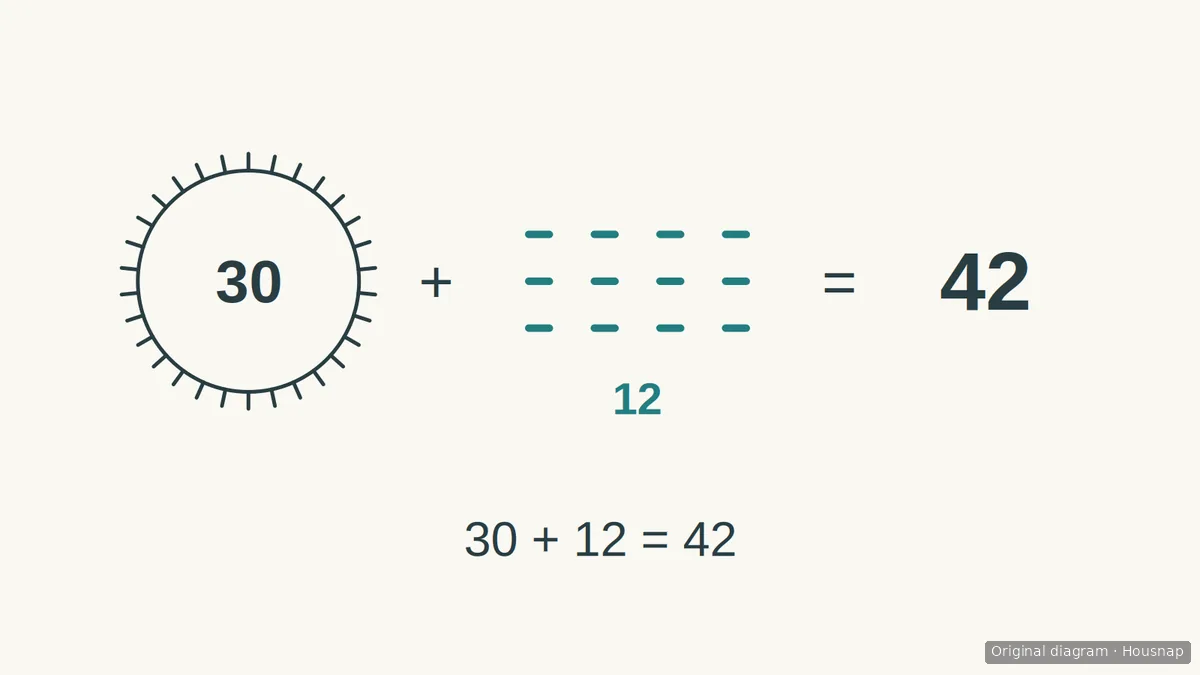
For the Q Series, J and JE, 1Zpresso’s worked example gives one revolution plus four numbered intervals as 30 + (4 × 3) = 42 clicks. This is an example of reading the adjustment, not a recommended brewing setting.
The same guide describes the K-Ultra’s “12.3 numbers” as one full revolution, then number 2 and three more clicks: 100 + 20 + 3 = 123 clicks. The point is to read each model’s notation, not apply one decimal interpretation to every chart.
When saving a setting, include both the manufacturer’s notation and your expanded count. A photo of the dial can supplement that note, but the written record should also say how many complete revolutions were made.
Save a starting setting, then change one thing
Use a point within your model’s documented range for the intended brewer as a trial, not a promise of the recipe author’s result. Keep a short note on your phone or in an existing notebook:
- Exact grinder model and any changed adjustment parts.
- The manual’s zero reference and the direction used to reach the setting.
- Complete revolutions, remaining clicks and total clicks where applicable.
- Coffee, brewer, coffee and water quantities, and the rest of the recipe.
- What you tasted and the single change you want to try next.
For the next brew, make a small recorded adjustment within the model’s permitted range while keeping the rest of the recipe steady. Write “two clicks coarser” alongside the new full setting, rather than replacing the old note with an unexplained number. Repeat a setting you enjoy before making another change.
If you have a pour-over grinder setting but have not settled the coffee and water quantities, use the pour-over ratio and recipe guide to establish that baseline. This recording task itself does not require a new grinder or a dedicated logging accessory.
Come è stata costruita questa guida
AI-written for Housnap using the manufacturers’ 1Zpresso adjustment chart and J-series manual, plus KINGrinder’s K4/K6 adjustment instructions. The recording workflow is an editorial recommendation; the numerical examples explain notation and are not cross-grinder conversions or results of original testing.