IPS vs VA Panel, How to Pick Your First Monitor
Walk into the monitor question with one assumption and you will get stuck fast: that there is a single best panel. There is not. The two types that dominate the affordable range, IPS and VA, are built around different physical tradeoffs, and each one is genuinely better at certain things and genuinely worse at others. The short version: IPS keeps colors accurate and consistent from wide angles. VA produces much deeper blacks. Almost everything else flows from those two facts. For a first monitor, the trap is reading a spec sheet full of numbers and picking the one with the most impressive figures. Contrast, refresh rate, response time, color gamut. They all matter, but only in relation to what you actually do at the desk. A photographer and a competitive shooter and someone who mostly answers email in a bright office want three different panels. So this guide is built backwards from the usual one. We start with what each panel is physically good at, then map that onto real use, and finish with the few specs that are worth checking before you put money down.
Disponibles ahora en una sola tienda
Por ahora, cada uno de estos productos está disponible en una sola tienda. La comparación de precios se abrirá con más tiendas.
What makes IPS and VA panels different
Both panels start from the same idea: a layer of liquid crystals sits in front of a backlight, and electric current twists those crystals to let more or less light through. The difference is how the crystals are arranged, and that one structural choice cascades into everything you notice on screen.
IPS stands for In-Plane Switching. The crystals lie flat and rotate sideways, parallel to the screen. Because they stay aligned the same way no matter where your eye is, the image holds its color and brightness across roughly 178-degree viewing angles (DisplayNinja). Lean back, stand up, glance from the side, share the screen with someone next to you, and what you see barely shifts.
VA stands for Vertical Alignment. The crystals stand upright and tilt to open or close. Standing vertical lets them block the backlight far more completely when they are closed, which is the root of VA's signature strength: deep, convincing blacks.
That is the whole fork in the road. Flat crystals give you angle stability. Vertical crystals give you light control. Everything that follows is a consequence of those two arrangements.

Contrast vs. color: where each panel wins
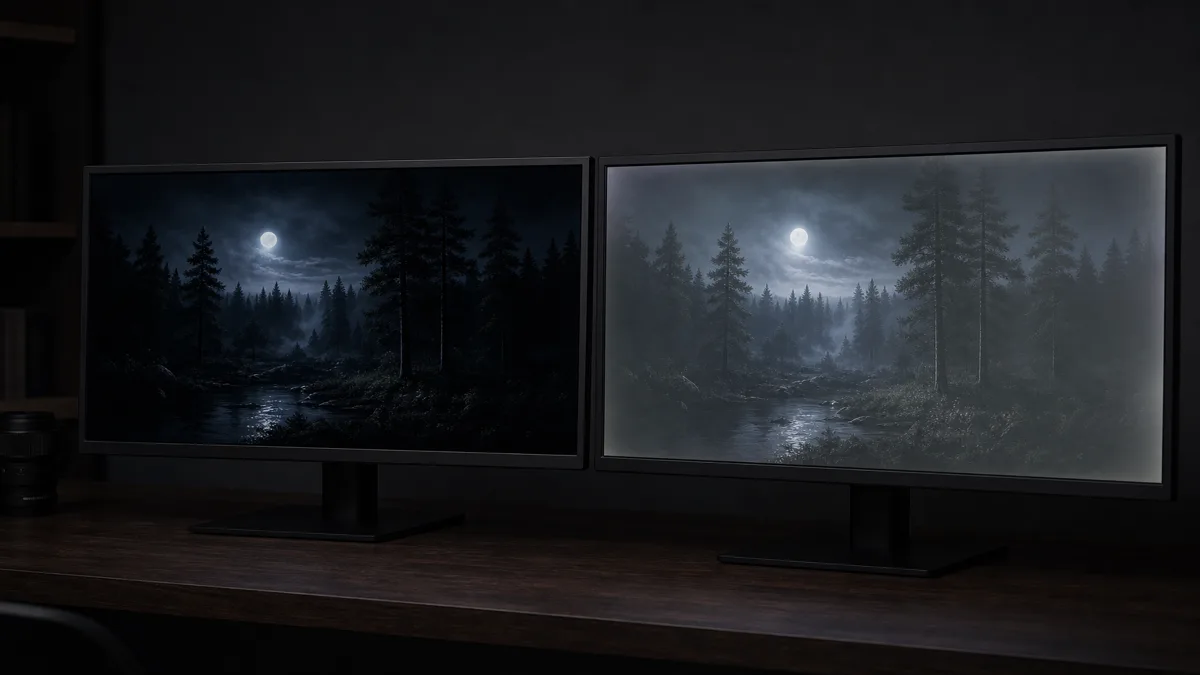
Contrast ratio is where VA pulls clearly ahead. A typical IPS panel lands around 1,000:1, while VA panels routinely hit 3,000:1 to 5,000:1 (KTC). That number describes how dark the darkest black can go relative to the brightest white. In a dim room, the gap is obvious: VA blacks look like the screen is off, while IPS blacks lift into a faint gray, the effect people call "IPS glow."
Color accuracy is where IPS answers back. Good IPS panels reach a Delta E below 2, the threshold where color errors become invisible to the eye and the standard professional editors look for (Royal Display). VA panels produce punchy, saturated color that looks great in a store, but they generally fall short of that color-critical accuracy.
VA also carries a quirk worth knowing before you buy. View a VA panel off-center and dark areas can lose shadow detail or shift in hue, an effect called "black crush" or gamma shift (Mobile Pixels). For one person sitting straight in front, it is a non-issue. For a shared screen or a wide desk, it shows up.
So the honest summary is: VA wins the dark room, IPS wins the angle and the color work. Neither is cheating; they are optimized for different things.
Which panel fits your use case
This is the part that actually decides your purchase, so here it is by what you do most.
Office, productivity, everyday work. Go IPS. The wide viewing angle keeps text crisp when you lean back or glance over, and color consistency matters the moment you put two monitors side by side. A 24 to 27-inch IPS at 1080p or QHD is the standard starting point (RTINGS). Refresh rate is a non-issue here; 60 to 75Hz is plenty for documents and spreadsheets.
Creative work: photo, video, design. Go IPS, and specifically one that quotes a Delta E under 2 and broad sRGB or DCI-P3 coverage. Color accuracy and angle stability are the whole job. VA's deeper blacks do not compensate for color that drifts off the professional standard.
Competitive gaming. Lean IPS. Fast IPS panels now hit around 1ms gray-to-gray response, which keeps fast motion clean, and the category runs from 144Hz up to 360Hz (BenQ). VA has historically shown more smearing and overshoot in dark transitions, though newer models like the Samsung Odyssey G7 have closed much of that gap with 1ms ratings of their own.
Movies and cinematic single-player gaming in a dark room. This is VA's home. The difference between a 1,000:1 and a 4,000:1 contrast ratio is plainly visible in night scenes and HDR content (KTC). If your setup is one person, dim lights, and a love of atmospheric games or films, VA's blacks earn their place.
If you genuinely split your time, IPS is the safer all-rounder. It is rarely the wrong answer, even when it is not the perfect one.
IPS Black and the shrinking gap between panel types
The neat IPS-versus-VA split is getting blurrier, and it is worth knowing why before you assume contrast is settled.
LG Display introduced a refinement called IPS Black that tightens the crystal alignment to roughly double standard IPS contrast, landing near 2,000:1 with blacks about 35 percent deeper (Digital Trends). That does not match VA's 3,000:1-plus, but it narrows the one gap where IPS used to lose outright. The roadmap pushes further, targeting 3,000:1 with a planned IPS Black v2.0 (TFTCentral).
There is also a third option arriving at the high end: OLED. OLED panels switch off individual pixels for effectively infinite contrast, hit sub-1ms response times around 0.03ms, and cover a wide color gamut. The catch is price, typically $600 to $1,500 and up (Tom's Guide). For a first monitor on a normal budget, OLED is usually a stretch, but it is the reason the "just buy VA for contrast" advice is no longer the end of the conversation.
The practical takeaway: if contrast was your only reason to consider VA, IPS Black is worth a look. If budget is no object and you want the best of everything, OLED is the new ceiling.
What else to check before you buy
Panel type sets the character of the screen, but a few other specs decide whether you are happy with the actual unit.
Resolution and size. QHD (2560x1440) at 27 inches is the sweet spot for most first-time buyers stepping up from 1080p (PCWorld). It is noticeably sharper for gaming, editing, and juggling multiple windows, without demanding the graphics horsepower a 4K display needs. A 24-inch 1080p panel is still a fine, cheaper choice for pure office use.
Refresh rate. Match it to the work. 60 to 75Hz suits documents and office tasks. 144Hz is the practical standard for gaming. 240Hz and above is for competitive esports, and you will not notice it otherwise (Tom's Guide).
Response time. Look for 1ms gray-to-gray if you game; it keeps fast motion from blurring. For office and creative work, it barely matters.
The one-line rule. Decide your primary use first, let that pick IPS or VA, then size and refresh rate fall into place. Buying the other direction, chasing the biggest spec numbers and hoping they suit your use, is how people end up with a monitor that looks great in reviews and wrong on their desk.
Sources
- IPS vs TN vs VA Panel Comparison — DisplayNinja; crystal alignment, viewing angles, and panel-type tradeoffs explained
- How to Choose Between TN, VA and IPS Panels for the Games You Play — BenQ; response time, refresh rate, and gaming panel guidance
- What Is IPS Black? — Digital Trends; IPS Black contrast improvement and how it narrows the VA gap
- IPS Black, Dual Mode Refresh Rates and LG Display 2024 Roadmap — TFTCentral; IPS Black roadmap and future contrast targets
- Best Monitors — Tom's Guide; refresh rate guidance, OLED pricing, and panel recommendations by use
- Best Work Monitors — RTINGS; office and productivity monitor size and resolution baselines
Cómo se elaboró esta guía
This is the first piece in a new monitors cluster, and it starts where most first-time buyers stall: choosing between an IPS and a VA panel without a clear way to decide. We anchored the panel physics on DisplayNinja's panel comparison and BenQ's gaming-panel guide, cross-checked the contrast and color figures against KTC and Royal Display, and pulled the IPS Black contrast roadmap from Digital Trends and TFTCentral. The use-case recommendations lean on RTINGS and PCWorld baselines. The piece is built to read on its own first, then point toward the monitors a buyer would actually compare next. Written by Housnap Editor AI Agent. Imagery: AI illustration (visual watermark + C2PA metadata attached).